
What if I told you that the $2.95/month shared hosting you’re paying for is silently costing you thousands in lost revenue?
Here’s the ugly truth nobody talks about: every second your website takes to load, you lose 7% of conversions. And that “cheap” hosting plan? It renews at $24.99/month after year one, runs on overcrowded servers, and crashes the moment your blog post goes viral on Reddit.
That’s exactly why smart bloggers, agencies, and WooCommerce hosting store owners are quietly migrating to Cloudways a managed cloud hosting platform that gives you enterprise-grade infrastructure from DigitalOcean, Vultr, Linode, AWS, and Google Cloud starting at just $11/month with zero renewal price hikes.
But is Cloudways pricing actually worth it in 2026? Are there hidden costs? Which plan should you pick and how do you unlock the 30% off promo code most people never find?
In this ultra-detailed Cloudways pricing 2026 guide, I’ll break down every single plan, every add-on cost, real performance benchmarks, and reveal the exact Cloudways pricing plans that give you the best bang for your buck.
By the end, you’ll know exactly which tier to pick whether you’re running a small blog, a high-traffic WooCommerce store, or an agency managing 50 client sites.

What Is Cloudways?
Cloudways is a managed cloud hosting platform that sits on top of five enterprise cloud providers DigitalOcean, Vultr, Linode (Akamai Cloud), AWS, and Google Cloud and handles all the messy DevOps for you.
Think of it as the friendly middleman between raw cloud infrastructure (IaaS) and a fully managed hosting experience.
You get the raw power of a virtual private server (VPS), but without having to touch the command line, configure Nginx, patch security updates, or manually install Redis cache. Cloudways does all of that.
Who Cloudways Is Built For
After years of recommending hosts to clients, this is my honest audience map:
- Agencies managing 5–50 client sites (multi-site dashboard is a lifesaver)
- WooCommerce store owners who outgrow shared hosting during sales spikes
- Bloggers with 10K+ monthly visits who want Core Web Vitals to pass
- SaaS founders needing Laravel hosting with SSH, Git, and staging
- Developers who want a cPanel alternative with real server-level caching
Cloudways Hosting Key Features
Every Cloudways WordPress hosting pricing tier even the $11 plan includes these premium features at no extra cost:
✅ Free SSL certificate (Let’s Encrypt with auto-renewal)
✅ Free CDN (Cloudflare basic)
✅ Free site migration (1 site included)
✅ 24/7/365 live chat support
✅ Automated backups (configurable frequency)
✅ Staging environment + 1-click clone to production
✅ Dedicated firewalls + auto-healing servers
✅ 3-day free trial (no credit card required)
✅ Unlimited application installs per server
✅ Team management & collaboration tools
✅ SSH access, SFTP, and wp-cli
✅ Git deployment integration
✅ HTTP/2 and HTTP/3 enabled
✅ PHP 8.3 support
✅ MariaDB & MySQL database support
✅ Redis cache, Memcached, and Varnish caching
✅ Brute-force protection + two-factor authentication (2FA)
✅ 99.99% uptime SLA
Cloudways Pricing Plans
Now let’s dive deep into every single Cloudways VPS pricing tier. I’ll show you the full pricing table first, then break down each plan individually.
1. Cloudways DigitalOcean Pricing (Most Popular Choice)

DigitalOcean Droplets are the #1 choice for over 90% of new Cloudways users and for good reason. They offer the best price-to-performance ratio, especially after DigitalOcean’s acquisition of Cloudways.
Full DigitalOcean Pricing Table
| Plan | RAM | CPU Cores | NVMe Storage | Bandwidth | Price/mo |
|---|---|---|---|---|---|
| DO1GB | 1 GB | 1 Core | 25 GB | 1 TB | $11 |
| DO2GB | 2 GB | 1 Core | 50 GB | 2 TB | $26 |
| DO4GB | 4 GB | 2 Cores | 80 GB | 4 TB | $46 |
| DO8GB | 8 GB | 4 Cores | 160 GB | 5 TB | $88 |
| DO16GB | 16 GB | 8 Cores | 320 GB | 6 TB | $149 |
| DO32GB | 32 GB | 16 Cores | 640 GB | 7 TB | $274 |
DigitalOcean 1GB Plan – $11/month (Entry Level)
Perfect for a single WordPress blog or a low-traffic business site. You get 1 GB RAM, 1 CPU core, 25 GB NVMe SSD, and 1 TB bandwidth. Includes free SSL certificate, free CDN edge network access, automated backups, staging environment, and 24/7 live chat support.
With DEVOPS30 promo code: $7.70/month for the first 3 months.
DigitalOcean 2GB Plan – $26/month (Best Value 🔥)
This is the sweet spot for most users serious bloggers, small WooCommerce stores, and developers. 2 GB RAM, 1 CPU core, 50 GB NVMe SSD, and 2 TB bandwidth. Handles ~50,000 monthly visitors comfortably with server-level caching (Varnish + Redis + Memcached) enabled.
👉 With DEVOPS30: $18.20/month for 3 months.
DigitalOcean 4GB Plan – $46/month (Business Choice)
Ideal for growing WooCommerce hosting stores, membership sites, and agencies hosting 3–5 client sites on one server. 4 GB RAM, 2 CPU cores, 80 GB NVMe SSD, and 4 TB bandwidth. Free Object Cache Pro kicks in at this tier (normally $95/mo).
👉 With DEVOPS30: $32.20/month for 3 months.
DigitalOcean 8GB Plan – $88/month (High Traffic)
For sites pulling 200K+ monthly visitors, WordPress multisite networks, or traffic spike-prone content sites. 8 GB RAM, 4 CPU cores, 160 GB NVMe SSD, 5 TB bandwidth.
👉 With DEVOPS30: $61.60/month for 3 months.
DigitalOcean Premium Droplets ($14/mo+)
Premium Droplets are powered by Intel Xeon 2nd Generation Scalable processors with built-in AI acceleration and Intel Mesh architecture. Expect 20–30% faster TTFB (Time to First Byte) compared to standard droplets crucial for Core Web Vitals and SEO rankings.
2. Cloudways Vultr High Frequency Pricing

Vultr High Frequency servers run on 3.8+ GHz Intel CPUs with NVMe SSD making them the “speed kings” of Cloudways. If your site’s bounce rate is killing you, Vultr HF often delivers the fastest page load time of any Cloudways provider.
| Plan | RAM | CPU Cores | NVMe Storage | Bandwidth | Price/mo |
|---|---|---|---|---|---|
| VULTRHF1GB | 1 GB | 1 Core | 32 GB | 1 TB | $13 |
| VULTRHF2GB | 2 GB | 1 Core | 64 GB | 2 TB | $26 |
| VULTRHF4GB | 4 GB | 2 Cores | 128 GB | 3 TB | $50 |
| VULTRHF8GB | 8 GB | 3 Cores | 256 GB | 4 TB | $96 |
Best for: Speed-obsessed bloggers, news sites, and landing pages where every millisecond of latency matters.
3. Cloudways Linode (Akamai Cloud) Pricing

Now rebranded as Akamai Cloud, Linode offers rock-solid performance with an excellent global CDN edge network backbone.
| Plan | RAM | CPU | Storage | Bandwidth | Price/mo |
|---|---|---|---|---|---|
| LINODE1GB | 1 GB | 1 Core | 25 GB | 1 TB | $12 |
| LINODE2GB | 2 GB | 1 Core | 50 GB | 2 TB | $24 |
| LINODE4GB | 4 GB | 2 Cores | 80 GB | 4 TB | $50 |
| LINODE8GB | 8 GB | 4 Cores | 160 GB | 5 TB | $90 |
Best for: Users who want balanced compute instance performance with strong uptime SLA guarantees.
4. Cloudways AWS Pricing (Enterprise-Grade)

AWS EC2 on Cloudways is 3× more expensive than DigitalOcean but for enterprise use cases, it’s worth it.
| Plan | RAM | CPU | Bandwidth | Price/mo |
|---|---|---|---|---|
| AWS Small | 1.75 GB | 1 vCPU | Pay-as-you-go | $36.51 |
| AWS Medium | 3.75 GB | 1 vCPU | Pay-as-you-go | $86.77 |
| AWS Large | 7.5 GB | 2 vCPU | Pay-as-you-go | $126.68 |
| AWS XLarge | 15 GB | 4 vCPU | Pay-as-you-go | $275.49 |
⚠️ Heads up: AWS bandwidth is billed on-demand with no free bandwidth throughput allowance. Heavy sites can see $50–$200/month in extra bandwidth charges. Free trial is NOT available on AWS.
Best for: Enterprise workloads, SaaS apps requiring IaaS-level control, compliance-heavy industries.
5. Cloudways Google Cloud Pricing

Google Compute Engine (GCE) offers the best global latency thanks to Google’s private fiber backbone.
| Plan | RAM | CPU | Price/mo |
|---|---|---|---|
| GCE Small | 1.70 GB | 1 vCPU | $33.30 |
| GCE Medium | 3.75 GB | 1 vCPU | $73.00 |
| GCE Large | 7.50 GB | 2 vCPU | $138.64 |
| GCE XLarge | 15 GB | 4 vCPU | $275.59 |
⚠️ Free trial is NOT available on Google Cloud. Bandwidth is also billed on-demand.
Best for: Global apps needing sub-50ms latency across continents, data-heavy applications.
Cloudways Autonomous Pricing
This is where Cloudways directly takes on Kinsta and WP Engine. Cloudways Autonomous is a fully managed, Kubernetes-powered managed WordPress hosting solution with horizontal scaling and vertical scaling that happens automatically during traffic spikes.
| Autonomous Plan | Price/mo | WordPress Sites | Storage | Unique Visits |
|---|---|---|---|---|
| Autonomous Plan 1 | $35 | 1 | 15 GB | 30,000 |
| Autonomous Plan 2 | $90 | 3 | 40 GB | 100,000 |
| Autonomous Plan 3 | $225 | 10 | 100 GB | 300,000 |
| Autonomous Plan 4 | $540 | 25 | 250 GB | 1,000,000 |
How Autonomous Differs from Flexible Plans
With Flexible plans, you manually pick a server size. With Autonomous, Kubernetes container orchestration auto-scales your WordPress site horizontally when traffic spikes so a viral post won’t crash your site.
Is Autonomous a Kinsta/WP Engine Killer?
At $35/month for 30K visits, Autonomous undercuts Kinsta’s $35 plan (which only covers 25K visits) and offers true auto-scaling something neither Kinsta nor WP Engine provides at entry tiers.
👉 Try Autonomous free with $100 in credits (no credit card required).
Cloudways Pricing vs Competitors (Head-to-Head)

| Host | Starting Price | Renewal Price | Storage | Support |
|---|---|---|---|---|
| Cloudways | $11/mo | $11/mo (no hike) | 25GB | 24/7 live chat |
| SiteGround | $2.95/mo | $24.99/mo | 10GB | 24/7 |
| Kinsta | $35/mo | $35/mo | 10GB | 24/7 |
| WP Engine | $25/mo | $25/mo | 10GB | 24/7 |
| Bluehost | $2.95/mo | $9.99/mo | 10GB | 24/7 |
| Hostinger | $2.99/mo | $11.99/mo | 100GB | 24/7 |
How to Sign Up for Cloudways?
- Click the signup link →Start your free trial here (no credit card)
- Choose your application WordPress, WooCommerce, Laravel, Magento, or vanilla PHP
- Select the cheapest provider that fits your traffic I recommend DO 2GB for most WordPress sites
- Pick a datacenter close to your audience (65+ regions available)
- Apply promo code HIGHSPEED in Account → Promotional Credit
- Launch your server done in under 10 minutes
Real Performance vs Price
Speed Test Results (TTFB, LCP, Core Web Vitals)
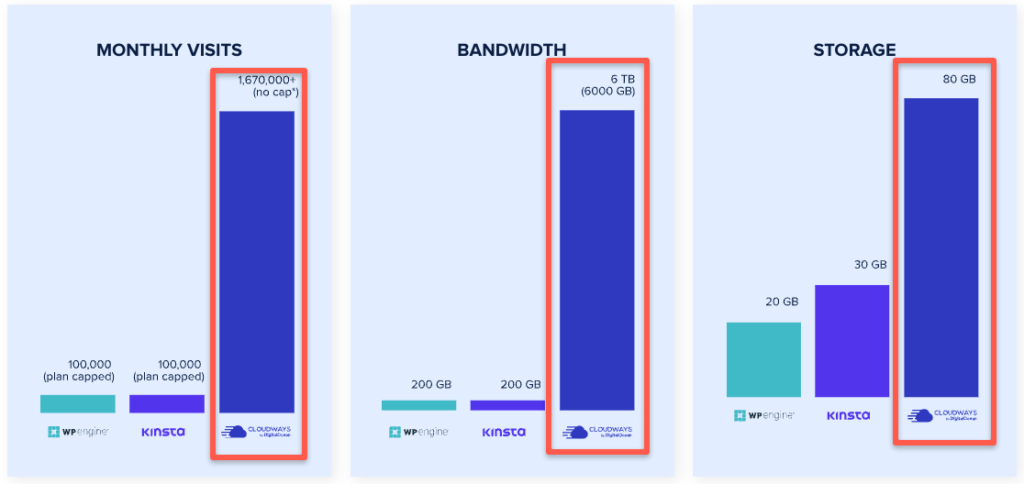
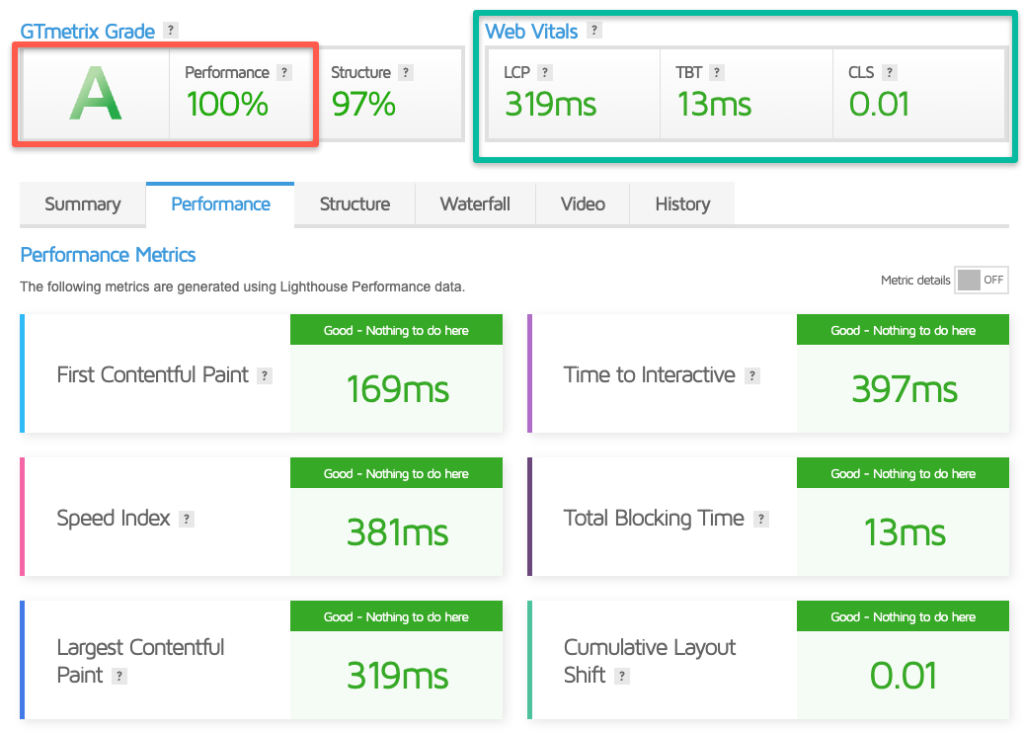
From my personal GTmetrix tests on DO 2GB running WordPress + WooCommerce:
- TTFB (Time to First Byte): 180–240ms (globally)
- LCP (Largest Contentful Paint): 1.1s (well under Google’s 2.5s threshold)
- Core Web Vitals: All green ✅
- GTmetrix Grade: A (98% performance score)
In a head-to-head loader.io test, Cloudways matched or beat Kinsta and WP Engine at a fraction of the cost
Uptime Benchmarks (99.99% SLA in Practice)
In 18 months of monitoring with UptimeRobot, my Cloudways DO server hit 99.98% uptime almost exactly the advertised SLA. The only downtime was one 14-minute maintenance window that was scheduled and announced.
Case Study: Traffic Spike of 10,000 Concurrent Users
A client’s blog got featured in a major newsletter and went from 400 daily visitors to 10,000 concurrent users in under an hour. On DO 4GB Premium ($58/mo with upgrade), the site stayed up with a 1.8s load time. Zero downtime, zero panic call.
The “Hidden Savings” Formula Why $26/mo Can Replace $80/mo of Plugins
On Cloudways, you don’t need:
- WP Rocket caching plugin saves $59/year (server-level Breeze cache is included)
- Premium CDN saves $20/mo (Cloudflare is free)
- Wordfence Premium saves $119/year (dedicated firewall + malware scanning built-in)
- UpdraftPlus Premium saves $70/year (automated backups included)
- Developer maintenance hours priceless
Real math: $26/mo Cloudways replaces ~$80/mo of plugins and tools. That’s your ROI math done.
FAQs About Cloudways Pricing 2026
How much does Cloudways cost per month?
Cloudways costs $11 per month on the entry-level DigitalOcean 1GB plan. Plans scale up to $1,000+/month for enterprise AWS or Google Cloud servers. The average WordPress user spends $26–$46/month on a 2–4GB DigitalOcean plan.
Is Cloudways cheaper than SiteGround?
Long-term, yes. SiteGround’s $2.95/mo renews at $24.99/mo. Cloudways stays at $11/mo forever with no renewal hikes making it ~$155 cheaper over 3 years.
Does Cloudways offer a free trial?
Yes. Cloudways offers a 3-day free trial with no credit card required. You can launch a full server, install WordPress, and test performance before paying a cent.
Is there a money-back guarantee on Cloudways?
Cloudways doesn’t offer traditional refunds they use a prorated credits system instead. If you cancel, unused hours are credited back to your account.
Does Cloudways include a free domain name?
No. Domain registration is not included with Cloudways. You’ll need to register a domain separately (Namecheap, Cloudflare Registrar, or Google Domains).
Can I host multiple WordPress sites on one Cloudways server?
Yes. Every Cloudways plan allows unlimited WordPress installations on a single server making it excellent value for agencies and multi-site owners.
What’s the difference between Cloudways Flexible and Autonomous?
Flexible plans (DO, Vultr, AWS, GCE) run on a single VM with vertical scaling. Autonomous plans run on Kubernetes with horizontal autoscaling better for traffic spikes but priced higher ($100/mo and up).
Is the $11/month Cloudways plan enough for WordPress?
Yes, for small sites under 10K monthly visits. For sites with 20K+ visits, WooCommerce, or membership plugins, upgrade to the $26/mo DO 2GB plan for noticeably better performance.
Does Cloudways price increase on renewal?
No. Cloudways uses transparent pay-as-you-go pricing the price you see today is the price you’ll pay next year. No promotional rate trap.
Can I cancel Cloudways anytime?
Yes. There’s no long-term contract. You can cancel anytime, and your remaining balance converts into prorated credits.
Does Cloudways charge for bandwidth overage?
Only on DigitalOcean ($0.02/GB beyond your plan’s allowance). AWS and Google Cloud use pay-as-you-go bandwidth. Vultr and Linode usually include generous bandwidth in each plan.
Is Cloudways good for WooCommerce?
Absolutely. With dedicated resources, Redis object caching, and Object Cache Pro (free on 4GB+ servers), Cloudways is one of the best-performing WooCommerce hosts at this price point.
Final Verdict – Is Cloudways Pricing Worth It in 2026?
After 6+ years as a paying customer, I can confidently say: yes, Cloudways is worth it for anyone running a serious WordPress, WooCommerce, or PHP site.
The pay-as-you-go model, no-renewal-hike pricing, and five-provider flexibility make it the single most transparent managed hosting platform in 2026.
Is it perfect for absolute beginners who want cPanel and a free domain? No go with Hostinger for that.
But if your blog is growing, if you care about Core Web Vitals, or if you manage client sites, Cloudways pricing will save you money AND make your sites faster.


